


 It's a straight forward yet comprehensive spam filter for Outlook combining Bayesian filtering with smart white lists and works with all accounts...
Heinz Tschabitscher, email.about.com
 I'm very pleased with Spam Reader - it does a better job than built-in Outlook junk mail filter. I receive much spam and your product is a big help for me.
David Solomon, www.solsem.com
Great Product! This is the only spam filter I've used that actually reduces my spam in a helpful, effective and reliable manner! I highly recommend this software!
Scott Johnson
On Bayesian Filter tab of Spam Reader options window you can view some statistics and edit the custom dictionaries. Bayesian Filter statistics shows how many legitimate and junk messages have been analyzed for the database used by Bayesian Filtering Algorithm.
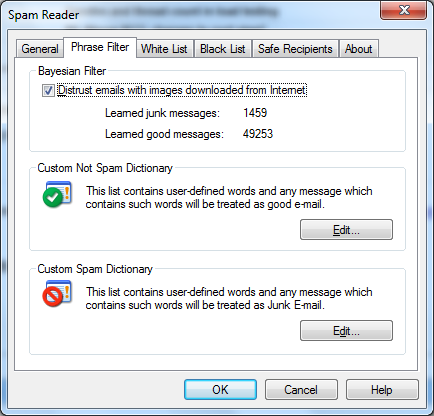
If you want to edit Spam or Non-Spam Dictionary you should click the "Edit" button in the corresponding frame. The following dialog window will appear.
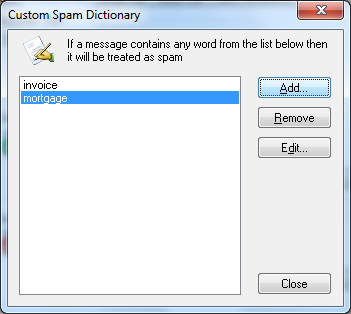
In this window you can do the following operations:
Add a new word / phrase. Click "Add..." button to add a new word to the dictionary.
Remove a word / phrase. Select one or more word you would like to remove and click "Remove" button.
Edit a word / phrase. Select a word you would like to edit and click "Edit" button. The dialog window will appear where you can change the selected word.

 Free Version
