


 It's a straight forward yet comprehensive spam filter for Outlook combining Bayesian filtering with smart white lists and works with all accounts...
Heinz Tschabitscher, email.about.com
 I'm very pleased with Spam Reader - it does a better job than built-in Outlook junk mail filter. I receive much spam and your product is a big help for me.
David Solomon, www.solsem.com
Thank you! I received 350+ Spam over last weekend. Spam Reader caught all but 6 of them, saving me time and unnecessary annoyance. This a fantastic piece of software!
Brad Irwin
After the installation you will see Spam Reader menu among the standard Microsoft Outlook menus.
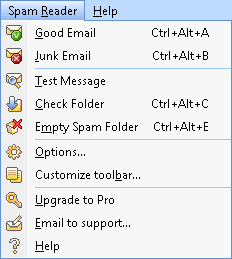
The menu displays commands to perform program operations. If you cannot see the menu, please, check FAQ section.
Spam Reader menu commands have the following functionalities.
Good E-Mail: The selected messages will be used as an example of legitimate mail to update the database for Bayesian Filtering Algorithm. Spam Reader will also perform a number of operations customized by the user on General tab of program options.
Junk E-Mail: The selected messages will be used as an example of junk mail to update the database for Bayesian Filtering Algorithm. Spam Reader will also perform a number of operations customized by the user on General tab of program options.
Test Message: Spam Reader will check if the selected message is spam. More details...
Check Folder: The current folder will be checked for spam messages. More details...
Empty Spam Folder: Spam Reader will empty the folder used for storing spam messages.
Options: Spam Reader Options window will appear where you can view and change Spam Reader program settings.
Customize toolbar: "Toolbar customization" dialog will appear where you can add/remove toolbar buttons by marking corresponding checkboxes.
Registration: Spam Reader Registration dialog window will appear to start the registration procedure.
Request for support: Spam Reader will automatically create a blank e-mail message to Spam Reader support team. In the message you can report about your questions or comments related to using Spam Reader.
Help: Spam Reader Help window will appear to provide you with detailed information about the program.

 Free Version
